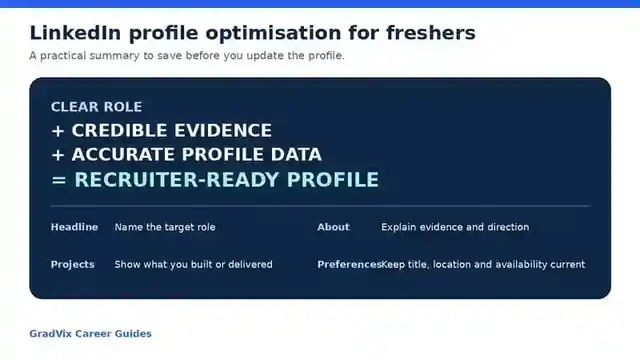
LinkedIn profile optimization for freshers means making one realistic role direction, genuine skills, education, projects and job preferences easy to understand across both structured profile fields and written evidence.
The objective is not to imitate an experienced professional or repeat keywords. A useful fresher profile gives recruiters, alumni and hiring managers a clear, consistent account of what you are preparing for and what evidence you can already show.
Review the profile after rebuilding it
Use the GradVix LinkedIn Profile Optimizer to review role clarity, headline, About section, skills and evidence. Verify every suggestion before applying it.
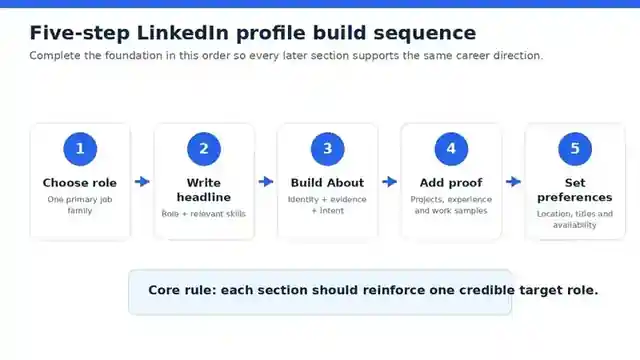
LinkedIn profile optimization: the five-stage fresher system
Choose direction
Define one realistic role family for the next application cycle.
Build positioning
Align the headline, About section, location and current status.
Add evidence
Explain projects, internships, coursework and responsibilities accurately.
Configure discovery
Complete skills, education, preferences and useful public links.
Review consistency
Check the public profile against the resume and applications.
How LinkedIn discovery works for a fresher
A LinkedIn profile can support ordinary member search, recruiter search, job recommendations and human review after someone sees a resume or application. These mechanisms are related but not identical.
What role are you preparing for?
The headline, About section, titles and recent evidence should communicate one understandable direction.
What skills did you select?
LinkedIn Recruiter can use standardised skills listed in the Skills section when filtering or assessing match.
Where are skills demonstrated?
Skills may also be inferred from profile text such as the headline, About section, titles and position descriptions.
Does the profile remain credible?
A recruiter still evaluates relevance, depth, eligibility, communication and truthfulness.
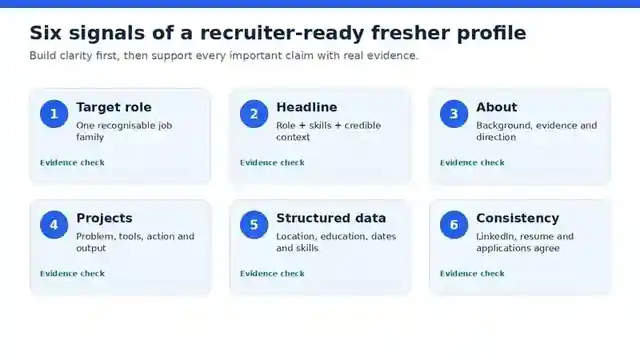
Which LinkedIn sections should a fresher complete first?
| Priority | Section | What it should communicate | Common problem |
|---|---|---|---|
| 1 | Headline | Target role, strongest relevant capabilities and evidence theme | Only “Student”, “Fresher” or “Open to Work” |
| 2 | About | Background, direction, evidence and current goal | Generic objective copied from a resume |
| 3 | Projects or internship | What you built, analysed, supported or improved | Project title without personal contribution |
| 4 | Skills | Relevant tools, methods and domain knowledge | Large unrelated list with no evidence |
| 5 | Education and certifications | Degree context and relevant learning | Incomplete dates or random badges |
| 6 | Location and preferences | Where and how you can realistically work | Outdated location or unrealistic preferences |
| 7 | Photo, banner, contact and URL | Professional identity and safe verification links | Distracting design or excessive personal data |
Choose one role direction before editing
Write one target role, three to six provable skills and your strongest evidence item. A B.Tech student targeting Java development should not give equal weight to Java, data science, marketing and HR. The direction can change later, but the current profile should not represent several unrelated careers at once.
Write a specific LinkedIn headline
A useful headline combines the target role, two to four genuine capabilities and an evidence context.
Target role or discipline | 2–4 relevant skills | project, internship or domain evidence
| Candidate | Weak headline | Improved headline |
|---|---|---|
| Data candidate | MBA Fresher | Looking for Job | Entry-Level Data Analyst | SQL, Excel, Power BI | Dashboard and Reporting Projects |
| Software candidate | B.Tech Graduate | Java Developer Fresher | Core Java, Spring Boot, SQL | Backend Project Experience |
| Marketing candidate | Digital Marketing Enthusiast | Digital Marketing Fresher | SEO, Analytics, Content | Campaign and Website Projects |
| Finance candidate | B.Com Fresher | Accounts and Finance Fresher | Excel, Tally, GST Basics | Reconciliation Coursework |
Do not use “expert”, “specialist” or senior titles when the evidence does not support them. See the LinkedIn headline examples for freshers for more role-wise patterns.
Build the About section around evidence
A practical fresher About section normally covers five points: background, target role, strongest capabilities, one or two evidence examples and the opportunity being explored.
I am a B.Tech graduate preparing for entry-level Java development roles. Through academic and personal projects, I have used Core Java, Spring Boot, REST APIs, SQL and Git.

In a recent backend project, I designed API endpoints, connected the application to a relational database and tested common request and validation flows. I am currently strengthening debugging, data structures and deployment fundamentals.

I am interested in junior Java or backend-development opportunities where I can contribute to real product work and continue building production-quality engineering habits.
Replace every skill and activity with your actual facts. Use the LinkedIn About section examples for additional candidate types.
Use projects and internships as fresher evidence
Experience evidence can include internships, academic projects, freelance work, volunteering, research, campus responsibilities and substantial coursework when each item is labelled honestly.
| Evidence type | What to record | Credible example |
|---|---|---|
| Technical project | Problem, stack, contribution, testing and output | Built REST endpoints in Spring Boot and connected them to MySQL for a task-management application |
| Analytics project | Dataset, cleaning, analysis, visualisation and finding | Cleaned sales data in Excel and created a Power BI dashboard comparing monthly product performance |
| Internship | Team context, assigned work, tools and deliverables | Supported keyword research and weekly performance reporting during an eight-week internship |
| Campus responsibility | Responsibility, scale and result | Coordinated registrations and schedules for a 200-participant department event |
| Coursework | Only substantial role-relevant work | Completed a financial-modelling assignment using Excel assumptions, scenarios and variance analysis |
Do not manufacture metrics. A modest accurate result is stronger than a number you cannot explain. Add media or links only when they are safe to share and easy to review.
Use selected skills and contextual evidence together
Choose standardised relevant terms
Add the core tools, methods and domain skills required for the target role. Connect them to education or experience where the interface permits.
Show where the skill was used
“SQL” becomes more credible when a project description explains joins, cleaning, querying, validation or reporting work.
Do not fill every available skill slot. Relevance and support matter more than volume. Soft skills such as communication or teamwork are stronger when demonstrated through a project, event or internship example.
Configure Open to Work and preferences carefully
| Preference | Fresher decision | Risk to avoid |
|---|---|---|
| Job titles | Choose a small group of related entry-level roles | Mixing unrelated careers |
| Locations | Select places where you can genuinely work or relocate | Adding every major city without a plan |
| Workplace type | Choose remote, hybrid or on-site realistically | Assuming all entry-level work can be remote |
| Employment type | Select full-time, internship or contract options you understand | Accepting categories you will not consider |
| Start date or notice | Keep availability accurate | Claiming immediate joining during exams or commitments |
| Expected salary | Use careful research and realistic expectations | Treating the field as a guaranteed offer level |
LinkedIn currently allows members in India to provide notice period or availability and expected annual salary through Open to Work; those fields are visible to recruiters only. Members can choose public or recruiter-only Open to Work visibility, but LinkedIn does not guarantee complete privacy from a current employer.
Photo, banner, links and privacy
- Use a clear recent photo with a simple background.
- Use the banner to support the role or portfolio theme, not to display a crowded skill cloud.
- Keep the name consistent with application documents.
- Use a professional email address and share only contact details you are comfortable making visible.
- Create a clean public-profile URL where available.
- Do not publish Aadhaar, PAN, passport, bank, home-address or other sensitive identifiers.
- Remove private information from any public resume, portfolio or project file.
Use activity and networking to support the profile
Daily posting is not required. Useful activity can include a thoughtful comment, a concise project learning, a portfolio update, a question to an alumnus or following employers in the target field.
- Connect with classmates, alumni, internship colleagues and professionals where genuine context exists.
- Personalise a request when the relationship or request needs explanation.
- Do not ask a new contact for a referral immediately.
- Avoid generic AI-generated comments that add no information.
- Never publish confidential internship, employer, client or assessment material.
A 45-minute fresher LinkedIn build workflow
- Minutes 0–5: choose the target. Write one role, three to six provable skills and the strongest evidence item.
- Minutes 5–12: fix the introduction card. Update headline, location, current education or role and contact information.
- Minutes 12–22: write the About section. Use the five-part evidence structure and remove generic claims.
- Minutes 22–32: add evidence. Improve one project, internship or volunteer entry with tools, action and output.
- Minutes 32–37: organise skills. Select relevant terms and remove unsupported items.
- Minutes 37–42: set preferences. Review titles, locations, workplace type, employment type and availability.
- Minutes 42–45: inspect the public view. Test links, spelling, mobile readability and resume consistency.
Keep LinkedIn, resume and applications consistent
| Element | Resume | Must agree on | |
|---|---|---|---|
| Target direction | Tailored to the vacancy | Broader but focused | Role family and genuine capabilities |
| Education | Concise entry | Can include useful context | Institution, degree and dates |
| Projects | Short achievement bullets | Can contain fuller explanation and links | Tools, contribution and results |
| Internships | Role-specific bullets | Broader description | Title, organisation, dates and facts |
| Skills | Relevant to the application | Relevant to the career direction | No unsupported or contradictory claims |
Use the Resume Format for Freshers in India to build the matching resume and the Free ATS Score Checker when comparing it with a vacancy.
Continue through the LinkedIn cluster
LinkedIn Headline Examples for Freshers
Build a role-specific first line.
LinkedIn About Section Examples
Turn real evidence into a readable summary.
How to Improve LinkedIn Profile
Upgrade an existing profile step by step.
LinkedIn Profile Mistakes
Diagnose clarity, consistency and credibility gaps.
LinkedIn Optimisation 2026
Review current discovery, preferences and analytics.
90-Minute LinkedIn Weekly Routine
Maintain evidence, discovery and networking.
Common LinkedIn mistakes freshers should correct
| Mistake | Why it weakens the profile | Better action |
|---|---|---|
| Several unrelated role directions | The reader cannot identify likely fit | Choose one role family for the current search |
| Headline contains only status | “Student” provides no capability context | Add role, supported skills and evidence theme |
| About section uses adjectives | Claims such as hardworking are difficult to verify | Describe projects, actions and learning |
| Skills have no contextual proof | A long list can look copied or inflated | Connect core skills to projects or coursework |
| Projects omit personal contribution | Team work cannot be evaluated | State what you personally designed, analysed or delivered |
| Preferences are outdated | Recommendations and recruiter context may be misaligned | Review titles, locations and availability |
| Resume and profile conflict | Dates or claims can create a trust problem | Run a factual consistency check |
| Immediate referral requests | Creates weak relationships and reputational risk | Use context, relevance and patience |
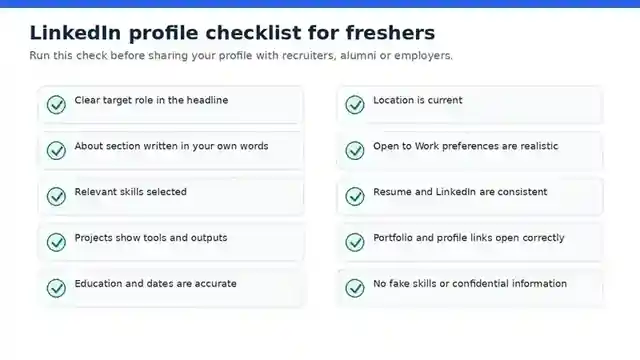
Final LinkedIn profile checklist for freshers
Frequently asked questions
Is LinkedIn useful for freshers with no work experience?
What should a fresher write in the LinkedIn headline?
How long should a fresher LinkedIn About section be?
Should projects be added to LinkedIn?
How many LinkedIn skills should a fresher add?
Should an Indian fresher use Open to Work?
Does posting every day improve recruiter discovery?
Can an optimised LinkedIn profile guarantee recruiter messages?
Official LinkedIn documentation used
- Skills filter and Skills Match in Recruiter
- Open to Work and India-specific preferences
- Job recommendations based on preferences and profile
- Profile Search Appearances
- LinkedIn guidance for creating a good profile
Build one clear, credible LinkedIn profile
Start with real education, projects and skills. Use GradVix to improve presentation, then verify every statement yourself.
Accuracy note: LinkedIn features can vary by account, plan, location, device and rollout status. Review the live settings and official Help pages before relying on a specific field or feature.